Table of Contents
Longer AI clips give an idea room to develop, but they also expose every weak decision in the brief. A simple planning method can make those 30 seconds feel intentional.
A five-second AI video can survive on one striking image. The subject appears, the camera moves and the clip ends before the viewer has time to question the logic. Thirty seconds is different. There is enough time for a setup, a change and a conclusion, but also enough time for the pacing to sag or the visual identity to drift.
That makes longer generation less of a prompting trick and more of a small production exercise. You need to decide what the audience should notice first, what changes in the middle and what image should remain at the end. The prompt still matters, but the thinking before the prompt matters more.
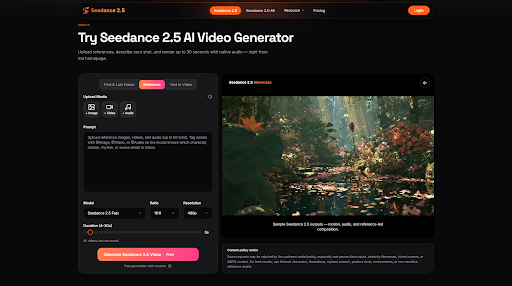
Tools built around longer output make this lesson easier to see. The browser-based Seedance 2.5, for example, is designed for clips of up to 30 seconds and can combine text with image, video, audio and 3D blockout references. Those options offer more control, but they are most useful when every reference has a clear job.
Start With One Change, Not a List of Images
The easiest way to lose a 30-second clip is to fill it with unrelated moments. A city skyline, a close-up, a product spin and a dramatic reveal may all look attractive on their own, yet together they can feel like a folder of samples rather than one idea.
Begin by describing a single change. A quiet desk becomes a working studio. An unopened package becomes a product in use. A character enters an empty room and discovers something. This gives the clip a direction. Every shot, camera movement and sound cue can then support that change.
A useful one-sentence test is: “By the end of the video, the viewer should understand or feel…” If the sentence contains three different outcomes, the brief is probably carrying too much.
Divide the Clip Into Three Simple Beats
You do not need a detailed screenplay for a short clip, but you do need timing. A basic three-beat structure works well:
- Opening: establish the subject and setting quickly.
- Development: introduce movement, interaction or a change in attention.
- Close: land on the product, character reaction or final visual message.
The beats do not need equal time. A product clip might spend five seconds establishing the setting, 18 seconds demonstrating motion and seven seconds on the final reveal. A short narrative may need a slower opening. What matters is that the clip has an internal rhythm instead of one action stretched across the full duration.
Directional language helps here. Rather than asking for a cinematic camera, describe when the camera moves and why: hold the wide frame during the opening, move closer as the subject reaches for the object, then settle into a clean product view. The instructions become easier to judge because each one belongs to a moment.
Give Every Reference a Role
More reference slots do not automatically produce more control. Uploading everything from a project folder can make the creative intention harder to read. A better approach is to build a small reference map before generation.
Label one image for character identity, another for the location, a short clip for camera movement and an audio sample for pace. If two files serve the same role, decide whether they reinforce each other or conflict. A warm indoor photograph and a cold outdoor palette may both be good references, but not if the brief never explains which should guide the final scene.
The support for multiple media types in this reference-led video workspace makes role assignment especially important. The site recommends tagging inputs such as @Image, @Video and @Audio so the model can connect a file to the intended character, motion, rhythm or scene detail. That is a useful habit even before opening the generator: name the purpose of every asset in plain language.
Try to keep the core set small. Add another reference only when it answers a question the existing set cannot. The goal is not to reach the maximum number of files. It is to remove ambiguity.
Write Motion as a Sequence
Prompts often describe appearance in detail and motion in one vague phrase. That imbalance becomes obvious in a longer clip. “A stylish product video” says little about what the product does, how the camera behaves or when the viewer should see the important detail.
Write motion in chronological order. For example: the camera begins at table height; the package slides into frame; the lid opens; the camera rises slightly; the product remains still for the final four seconds. This does not guarantee a perfect result, but it gives the model a clearer sequence than a collection of adjectives.
Keep the number of major actions realistic. If every five seconds introduces a new location, lens, character and object, continuity becomes difficult. A complete 30-second scene usually benefits from fewer actions held for longer.
Plan the Sound Before the Render
Sound is easy to treat as decoration, yet it changes how motion feels. A slow camera move against a fast beat can seem nervous. A product impact without a sound cue may feel weightless. If the platform can accept audio references or generate native audio, include sound in the brief rather than adding it as an afterthought.
You do not need to specify every second. Identify the overall pace, any important sync point and whether dialogue, ambience, music or effects should lead. For a product reveal, the crucial instruction might be that the musical lift and camera arrival happen together. For a quiet narrative, room tone may matter more than a soundtrack.
Review the Middle, Not Just the First Frame
People naturally judge a generation by its opening image and final result. Continuity failures often happen in between. Watch the full clip once without pausing, then inspect the middle section for changes in identity, lighting, product shape, screen direction and motion speed.
Separate problems into two groups. A local problem affects one detail, such as a distracting object or an incorrect product color. A structural problem affects the whole scene, such as weak pacing or an unclear sequence. Local problems may be suitable for targeted editing. Structural problems usually require a clearer brief.
This distinction saves time. Regenerating an entire scene because of one small object can destroy the parts that already work. Trying to patch a weak story with local edits can create an endless series of corrections.
Use Preview Quality for Decisions, Not Delivery
When a platform offers several resolutions or render tiers, test the idea before spending more credits on the final output. A lower-cost preview is enough to judge timing, camera direction and reference consistency. Once those decisions are stable, a higher-resolution render can be used for delivery.
This approach is particularly useful with 30-second AI video generation, where a failed high-resolution attempt costs more than a short experiment. It also creates a healthier review process. Stakeholders can comment on the concept and timing before becoming distracted by fine detail.
A Better Brief Produces a Better Conversation
The real advantage of a longer AI clip is not simply that it contains more seconds. It gives a team something closer to a complete creative thought. That makes it easier to discuss the opening, the pacing, the product moment and the close in concrete terms.
Good results still require selection and judgment. References need roles. Motion needs order. Sound needs purpose. The middle needs as much attention as the first frame. When those decisions are made before generation, the tool has less guessing to do and the team has a clearer standard for deciding whether the result works.
A 30-second clip is long enough to reveal weak planning, but it is also long enough to carry a real idea. Treat it like a small production rather than an extended demo, and the extra time begins to feel useful.