
Table of Contents
Somewhere around September last year, I hit a wall that every freelance social media manager eventually runs into. Three of my six clients asked for daily Reels in the same week. Not repurposed carousels. Not static quote graphics with a Ken Burns zoom. Actual short-form video — the kind that stops thumbs and feeds the algorithm.
I said yes to all three, because that’s what freelancers do. Then I spent the next two weekends filming B-roll in coffee shops, color-grading on my laptop at midnight, and wondering if I’d made a career-ending mistake.
Five months later, I’m producing more video content than I ever have, I haven’t touched my camera in weeks for client work, and my average Reels engagement is up across every account I manage. The difference was AI-generated video — specifically, platforms like GenMix that bundle multiple AI models under one roof — but not in the way most “AI content” articles describe it. Let me explain what actually works in the real world of social media management.
The Math That Broke My Old Workflow
Here’s what daily Reels actually means when you manage multiple accounts:
- 6 accounts × 5 Reels/week = 30 short videos every week
- Each traditionally produced Reel takes 45–90 minutes (scripting, filming, editing, captioning)
- That’s 22–45 hours of video work alone — before I even think about stories, feed posts, engagement, or analytics
The math doesn’t work. You either hire help (killing your margins), reduce your client load (killing your income), or find a fundamentally different production method.
I chose the third option, and started testing AI video generators in October 2025.
My First Month Was Mostly Failures
I’ll be honest about the learning curve, because nobody talks about this part. My first batch of AI-generated Reels looked obviously synthetic. The motion was too smooth, the lighting felt flat, and two of them had that uncanny “AI shimmer” that viewers spot immediately.
The mistake I was making: I was trying to use AI to replace what I’d normally film. Product close-ups. People talking. Hands holding things. Those are exactly the scenarios where current AI video struggles most.
The breakthrough came when I stopped thinking about replacement and started thinking about content types I couldn’t produce before.
The Content Categories That Actually Work
After testing across six different accounts (two e-commerce brands, one SaaS company, one restaurant, one personal brand, and one fitness studio), I found four categories where AI video consistently performs well on social:
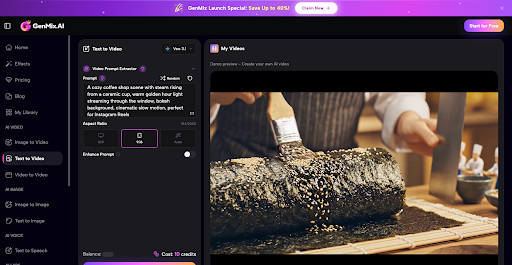
1. Mood and atmosphere clips. A 15-second cinematic shot of rain hitting a coffee cup. Autumn leaves drifting through an empty street. Abstract light patterns. These work brilliantly as background for text overlay Reels — the kind where the message matters more than the footage. I generate these by using a fast AI text-to-video tool like GenMix, and they consistently outperform stock footage because they’re not the same clips every other account uses.
2. Product visualization in impossible scenarios. One of my e-commerce clients sells candles. I can now show their product on a windowsill in a Parisian apartment at sunset, on a cabin porch during a snowstorm, or floating through a dreamy cloud sequence — none of which I could produce with a camera and a $200 shoot budget. These get saved and shared at 3–4x the rate of standard product photos.
3. Concept explainers and transitions. For my SaaS client, I create short visual metaphors: data flowing through networks, abstract representations of workflow automation, futuristic interface concepts. These perform exceptionally well as the first 2 seconds of a Reel, where the hook needs to be visual, not verbal.
4. Trend participation at speed. When a trending audio or format blows up on Instagram, you have roughly 48 hours before it’s oversaturated. I can now generate custom footage that matches a trend concept within an hour of spotting it. That speed advantage alone has landed three of my clients on Explore pages they’d never have reached otherwise.
What My Actual Weekly Process Looks Like Now
Monday morning, I batch-generate. I write 15–20 prompts across all accounts, queue them up (having access to multiple AI video models under one subscription is a game-changer), and let them render while I handle analytics and community management for the first hour of my day.
By mid-morning, I have raw clips. I pull them into CapCut, add text overlays, captions, trending audio, and brand-specific touches. The human editing layer is what makes AI-generated content feel intentional rather than lazy.
Tuesday through Thursday, I schedule and publish. Fridays, I review performance data and adjust prompts for the following week based on what resonated.
The entire video production portion of my week — which used to consume 25+ hours — now takes about 6. That freed-up time goes directly into strategy, community engagement, and the creative thinking that actually grows accounts.
The Numbers After Five Months
I track everything in a shared dashboard with my clients, so these are real numbers from real accounts:
- Video output: From 8–10 Reels/week across all accounts to 28–32
- Average Reel views: Up 65% (more content = more at-bats with the algorithm)
- Profile visits from Reels: Up 40% average across the six accounts
- Client retention: Haven’t lost a client since implementing this. Two have increased their retainers
- My hourly effective rate: Up roughly 70%, because I’m producing significantly more value in fewer hours
The single biggest factor isn’t the AI quality — it’s the volume. Instagram’s algorithm rewards accounts that post frequently and consistently. When you can sustain 5+ Reels per week per account without burning out, the compounding effect on reach is substantial.
Where This Still Doesn’t Work
I keep the camera out for three specific content types:
- Talking head content. AI-generated people still look off. Lip sync isn’t reliable enough for professional use. When a client needs to appear on camera, we film it.
- Real-time event coverage. Behind-the-scenes at a product launch, live reactions, unboxing — authenticity matters here, and audiences can tell the difference.
- User-generated content style. The slightly shaky, iPhone-quality aesthetic that performs well in some niches. AI video is too polished for this look.
My split is roughly 70% AI-generated and 30% traditionally filmed. That ratio lets me maintain authenticity where it matters while scaling volume everywhere else.
Which AI Models I Actually Use
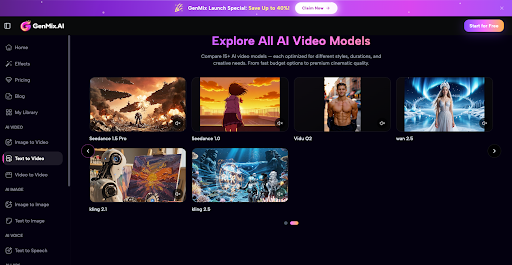
Different models produce different visual qualities, and that matters for social content. I primarily use Sora 2 for anything that needs realistic camera movement — product scenes, atmospheric shots, cinematic transitions. The way it handles virtual camera pans and depth of field is noticeably better than alternatives for the kind of “premium feel” social content that stops scrolling.
For faster iterations and simpler concepts (text backgrounds, abstract visuals, quick trend responses), I switch between Kling and Seedance depending on the aesthetic I need. Having access to multiple models through a single platform means I can match the tool to the content type without juggling separate subscriptions.
Practical Advice If You’re Managing Social Accounts
Don’t try to replace your entire content pipeline overnight. Start with one content category — I’d suggest mood and atmosphere clips — and use AI-generated footage as B-roll behind text overlay Reels. This is the lowest-risk, highest-reward entry point because viewers focus on the text, not the footage quality.
Spend your first week generating 20–30 clips and editing 5 into finished Reels. Compare performance against your traditional content. If it works (and for most accounts it will), expand into product visualization and concept explainers the following week — and browse their pre-made effect templates for extra inspiration.
The social media managers who’ll thrive in the next two years aren’t the ones who film everything themselves. They’re the ones who know when to generate and when to film — and who use the time savings to actually think about strategy instead of just keeping the content treadmill running.