
Table of Contents
Let’s be honest: You don’t really “own” anything you download from Netflix.
You know the drill. You spend 20 minutes downloading a movie for a flight, but by the time you land next week, that file has turned into a useless piece of digital dust. The Netflix app treats your downloads like a ticking time bomb—expiring in 48 hours to 30 days, locked inside their ecosystem where you can’t edit it, move it to a USB drive, or play it on your Plex server.
If you are tired of the “self-destruct” feature on your favorite movies, there is a fix. You need a real MP4 file. You need VidiFab Streaming Video Downloader.
Here is the modern, permanent way to download Netflix movies to MP4.
The Problem: Why Netflix Won’t Give You an MP4
First, understand the trap. Netflix uses something called DRM (Digital Rights Management). When you click the “Download” button in the official app, you aren’t saving a video file. You are saving a .nfv file—a key that lets the Netflix app unlock the movie temporarily.
The restrictions are brutal for serious collectors or frequent travelers:
The Expiration Date: Most titles vanish after 48 hours once you hit play.
The Quality Cap: The official app often limits downloads to 720p with stereo sound—killing your surround sound vibe.
The Wall Garden: You cannot play a Netflix download on a Kindle, a Tesla, an old iPod, or a standard Smart TV without the app.
To truly download Netflix movies to MP4, you need a tool that bypasses the “rental” logic and saves the raw stream directly to your hard drive.
The Solution: VidiFab Streaming Video Downloader
VidiFab is the ultimate solution for converting streaming content into universal MP4 files. Unlike screen recorders that look grainy and take hours, VidiFab downloads the actual data stream at speeds up to 16x faster than real-time.
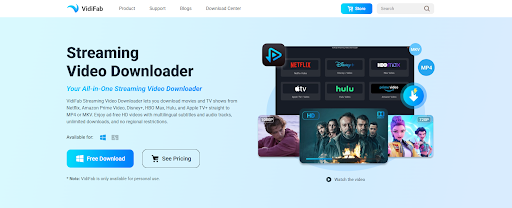
Here is how to permanently convert your Netflix watchlist into a personal archive.
Step 1: Install VidiFab Streaming Video Downloader
Download and install VidiFab Streaming Video Downloader on your Windows PC or Mac. Launch the software after installation.
Step 2: Open Netflix
Inside VidiFab, choose Netflix from the supported streaming services. Log in using your Netflix account credentials through the built-in browser.
Step 3: Find the Movie or TV Show
Use the search feature to locate the Netflix movie or series you want to download. Open the video’s details page.
Step 4: Customize Download Settings
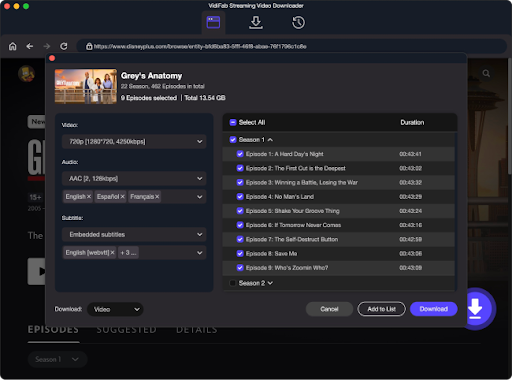
Click the Download button. Then, you can select:
- Video format: MP4
- Video quality
- Audio language
- Subtitle options
You can also choose whether to download a single episode or an entire season.
Step 5: Start Downloading
Click Download Now. VidiFab will begin downloading and converting the selected Netflix content into MP4 format. Once completed, you’ll find the MP4 files stored locally on your computer and ready for offline viewing.
Why You Need “Real” MP4 Files
Once VidiFab converts your Netflix movie to MP4, you are no longer a renter. You are an owner.
Here is what changes the moment you move away from the Netflix app to VidiFab:
- No More Expiration Dates: That MP4 file sitting on your external SSD will work in 10 years, regardless of whether Netflix still has the license to the movie.
- Universal Freedom: MP4 files work everywhere. You can put them on a USB stick for the car, upload them to a private channel in Plex, or AirPlay them to a hotel TV without logging into Netflix.
- Ad-Free Forever: Even if you are on Netflix’s “Standard with Ads” plan, VidiFab strips out the commercials automatically. You get the clean file.
- Subtitle Control: Learning Spanish or French? VidiFab can hardcode the subtitles into the video or save them as separate SRT files so you never lose the translation.
If you’re interested in exploring content beyond subscription-based platforms, movielk-hd one of the websites many users come across when looking for a wider selection of movies online. It can be worth comparing different viewing options to find the experience that best matches your entertainment preferences.
The Bottom Line
Netflix is a service, not an archive. If you want to watch Breaking Bad on a plane without worrying about a 48-hour clock, or if you want to preserve a childhood movie before it leaves the platform forever, you need VidiFab Streaming Video Downloader.
Stop playing by the rental rules. Download VidiFab today and turn your Netflix subscription into a permanent, offline, MP4 collection that is 100% yours.