Table of Contents
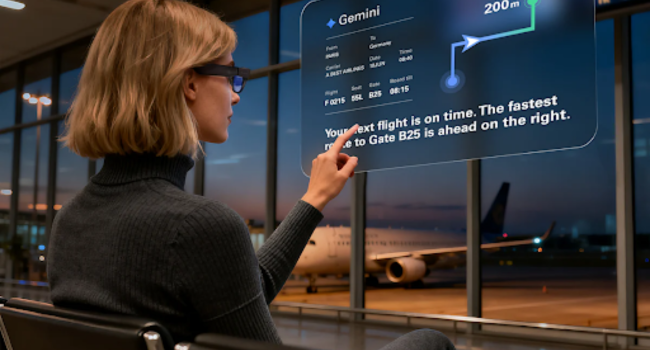
Phones eat your attention. You look down for the map, miss a turn, or step into a crosswalk you never saw. The RayNeo X3 Pro tries to flip that pattern. It places route prompts in front of your eyes so the road stays where it belongs.
This is a new shape for AI glasses. The category once meant a camera and a microphone. It now includes full-color heads-up displays that can surface a directional cue in your line of sight as you walk.
Five everyday situations build the case below. Walking. Riding. Traveling. Transit. The outdoors. In each, the glasses reduce a friction point that phone navigation often creates.
Why Phone Navigation Trips You Up Outdoors
Phone navigation works, but it still asks you to look down at the wrong moments. Your gaze leaves the curb, the oncoming bike, and the person you almost collided with. Research links phone distraction with higher pedestrian risk, especially when people look down at screens while walking.
A few accessories try to ease this. AI Glasses with a built-in display offer one cleaner alternative. They put the next turn where your eyes already are. They keep your hands free for a coffee, a stroller, or the bag you wheel through an airport.
Most attempts still fall short. Some carry only a tiny green panel. Some speak through earbuds. A full-color, binocular heads-up display in a normal frame is the rarer route. The X3 Pro is built around that display-first approach.
How the Heads-Up System Actually Works
In-view route prompts don’t happen by accident. The hardware behind these AI glasses pulls together four parts: a display, a tracking camera, a processor, and a voice layer. Each piece earns its place on the frame, and the navigation experience falls apart if any of them slip.
MicroLED Holds the Image Steady
Each lens carries a full-color MicroLED engine driven by RayNeo’s Firefly optics. The RayNeo X3 Pro cites a peak brightness up to 6,000 nits, which keeps a route line visible in noon sun. The image sits at a stated 43-inch equivalent floating in front of you.
A Second Camera Aids Positioning
Beside the 12MP Sony sensor sits a smaller monochrome camera. Its job is not photos. It supports spatial tracking and positioning, which helps the route prompts stay stable in view as you turn your head and walk forward.
Snapdragon AR1 at the Core
The platform is Qualcomm’s Snapdragon AR1 Gen 1, a 4nm chip purpose-built for this class of device. It drives the screen, the camera, and the wireless stack. Wi-Fi 6 and Bluetooth 5.3 are on board. Some processing happens on-device, while AI and map-related features may depend on connected services.
Gemini and the Five-Way Touch
Voice and touch are the two control surfaces. Gemini powers the voice layer, so you can ask for a re-route by speaking instead of tapping. A five-way touch on the temple handles menu navigation. The frame weighs about 76 grams, light for a binocular AI+AR frame, though heavier than simpler HUD glasses.
Five Times AR Navigation Beats the Phone
Specs only matter when they cash out in real life. The five moments below show where heads-up AR navigation starts to make practical sense, even when a phone is already within easy reach in your pocket.
1. A Crowded Sidewalk
At a lunch rush, you cannot afford to look down. The RayNeo X3 Pro keeps the next turn prompt in your line of sight. You stay eyes-up, see the bike messenger, and walk past the wrong storefront.
2. A Two-Wheel Commute
On a bike or scooter, hands stay on the bars and a heads-up cue floats in the upper view. A brief glance at a safe moment confirms the next turn. You never reach into a jacket for a screen the wind keeps slapping shut.
3. A Trip Abroad
Tokyo’s Shinjuku has over 200 exits, many signed in scripts you do not read. In a station like this, the X3 Pro handles two travel jobs: heads-up route prompts and translated captions when translation is on.
4. A Subway Transfer
Underground transfers are where hands-free prompts matter. If the route is loaded, these AI glasses keep the next step visible without forcing you to pull out your phone in the station. The floating display is more private than holding up a phone screen in a crowded car.
5. A Sunlit Trail
On a sunlit trail, a phone screen becomes a mirror. RayNeo cites peak brightness up to 6,000 nits, which keeps the bearing readable on bright dirt. Visibility is the hardware win; route accuracy and battery depend on workload and connectivity.
How the RayNeo X3 Pro Compares
Few rivals combine a binocular color display, camera, on-board AI, and translation in a single frame, though the trade-off is price and battery life. The grid below lines up the RayNeo X3 Pro against three notable peers in the AI glasses category.
| Capability | RayNeo X3 Pro | Meta Ray-Ban Display | Even Realities G2 | XREAL One Pro |
|---|---|---|---|---|
| Display | Binocular color MicroLED | Single-eye color (right lens) | Dual-lens green MicroLED HUD | Tethered color Micro-OLED |
| Built-in camera | 12MP main + 1 tracking | 12MP | None | None (optional XREAL Eye) |
| Built-in AI | Google Gemini | Meta AI | Even AI | None |
| Translation in lens | 14 languages | Yes | Yes | No |
| Standalone use | Yes | Companion app; phone-free walking directions | Phone-linked | USB-C tethered device |
| Listed weight | ~76 g | ~70 g | ~36 g | ~87 g |
| List price | $1,299 | $799 | $599 | $549 (current sale) |
What Sets the Display-First Class Apart
Display-first glasses surface information cleanly without a chunky frame on your face. A single-eye color panel covers notifications. A dual-lens HUD shows a directional cue. The trade-off is that each visual layer is narrower than a full binocular setup, and ecosystem features still vary widely by brand.
Where the Camera-First Class Lands
Camera-first frames weigh less and shoot solid POV clips. They skip the heads-up screen entirely, so for navigation they fall back on voice prompts. The RayNeo X3 Pro asks for more money and a touch more weight, then returns a visible route layer in exchange.

Trade-Offs Worth Knowing
No display glasses today is a finished product. The RayNeo X3 Pro spec sheet also shows the trade-offs clearly, as do those of every rival in this AI glasses category. A few caveats deserve a clear look before you commit to a $1,000-plus purchase.
Battery, Price, and App Depth
Battery varies sharply by task. RayNeo lists up to 5 hours of recording, 3 hours of music playback, or 36 minutes of video. A 38-minute fast charge tops it back up. The list price sits at $1,299, and the app ecosystem is still younger than the smartphone aisle.
Where the Floating Screen Earns Its Place
The pitch comes down to one shift. You stop pulling out your phone in the rain, and the route is already there waiting. The RayNeo X3 Pro stands out when the route, the language, and the next call surface on the same frame, without a screen in your hand.
AI glasses are slowly getting to that point on the spec sheet. This pair is one of the few available today that brings a real color AR display, camera, AI assistant, translation, and navigation into one wearable frame.